
 Ask ChatGPT
 Ask Perplexity
 Ask Claude
 Prefer us on Google
Introduction
Most follow-up emails fail for a boring reason: they run too long, stay vague, or just repeat the original pitch under a new subject line. Fixing that doesn't take a clever trick. It takes a short, specific structure that the response-rate research keeps pointing back to, plus a template you can adapt in under a minute instead of writing from a blank page every time.
This piece hands you that template, along with the small mechanical choices (length, question count, subject line, timing) that separate a follow-up that gets ignored from one that gets a reply.
What makes a follow-up email actually get a reply?
A follow-up email that works is short (50–125 words), asks 1–3 questions, references the prior touchpoint by name, and uses a personalized subject line. Each lever independently drives higher response rates, which is why they show up together in every effective follow-up rather than as separate tricks.
Boomerang's analysis of 40 million emails found that messages between 50 and 125 words all produced response rates above 50%, with the peak at 75–100 words. HubSpot's review of the same research corroborates the range and recommends sales emails stay under 200 words with 1–3 questions.
| Word count band | Response rate |
|---|---|
| 50–125 words | Above 50% |
| 75–100 words (peak) | 51% |
| Above 125 words | Declines gradually as length increases |
Source: Boomerang, analysis of 40 million emails, 2016.
Length is only half the mechanic. The same Boomerang dataset also measured how many questions an email asks, and that number moves reply rates on its own.
| Questions in the email | Effect on reply rate |
|---|---|
| 0 questions | Baseline |
| 1–3 questions | 50% more likely to get a reply than an email with 0 questions |
| Exactly 3 questions | 20% more likely to get a reply than an email with 8 or more questions |
Source: Boomerang, analysis of 40 million emails, 2016.
Asking more questions means more work for the reader, and that added work is what drags reply rates down. Neither table tells you what to write, though. That's what the template below is for: the concrete shape those two mechanics produce once you combine them with personalization and a clear ask.
The proven follow-up email template (copy and adapt)
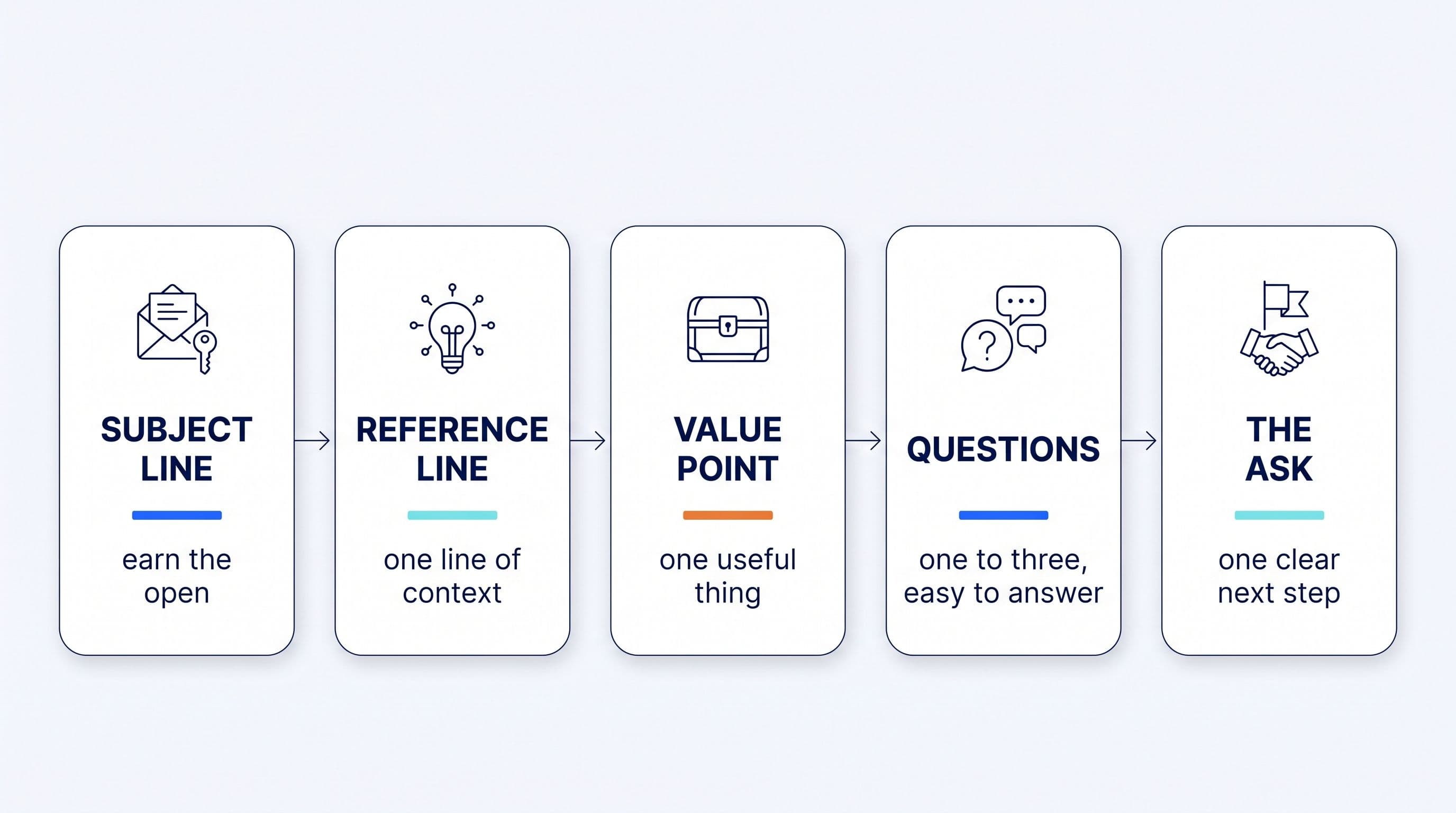
The structure has five parts: a personalized subject line, one line referencing the prior touchpoint, one new piece of value, 1–3 questions, and a single low-friction ask. Below the skeleton is a filled-in example so you can see how the parts fit together.
The skeleton:
Subject: [Their name] + [specific detail from the last interaction]

Hi [Name],

[One line referencing the exact interaction, not a generic "great talking to you."]

[One new piece of value: an insight, resource, or answer to something they raised.]

[One question that moves the deal forward. A second, only if it adds real information.]

[A single, low-friction call to action.]

[Your name]
Filled-in example:
Subject: Sarah, still curious about the onboarding timeline you asked about

Hi Sarah,

When we spoke last Tuesday, you mentioned onboarding speed was the main
thing standing between your team and a decision.

I dug into it: our average customer is fully live in 9 days, and here's
the breakdown by team size [link].

Does a 9-day timeline work for the rollout you're planning, or is there a
specific step that usually slows things down for teams your size?

Worth 15 minutes this week to walk through it?

[Your name]
That example runs about 80 words, inside the 50–125 word range tied to response rates above 50%. The opening line carries the personalization: it references a specific detail from the prior conversation instead of a generic check-in, the same mechanic that makes a personalized subject line outperform a generic one (covered below). The closing question is deliberately concrete. It asks for information ("does this timeline work") instead of a plain yes or no on "are you still interested."
Adapting the template for a sales call follow-up
For a follow-up after a sales call, swap the opening reference line for a one-sentence recap of what was discussed and the agreed next step, send it within 24 hours, and attach anything you promised during the call. The value line, questions, and call to action stay the same, so it's one template with a swappable opener, not a different email.
Subject: Recap + next step from our call today

Hi [Name],

Quick recap from today: you flagged [specific pain point], and we agreed
[next step].

[One new piece of value tied to that pain point: a resource, a data
point, or an answer to something they asked.]

[One question that moves toward the next step, e.g. confirming a
decision-maker or a follow-up meeting time.]

[A single, low-friction call to action.]

[Your name]
A same-day send matters more here than in any other follow-up scenario, because the call is still fresh for the prospect. Our related piece, "Follow-up email after a sales call: the same-day template that gets replies," walks through the timing and attachment details for this specific scenario in more depth.
Sending a follow-up email after no response (sample)
When there's been no reply, shorten the template further and swap the value line for a new angle instead of repeating the original pitch, without falling back on a generic "checking in." Here's a complete, ready-to-send sample:
Subject: One more data point on [the topic they cared about]

Hi [Name],

I know things get busy, so I'll keep this short.

Since we last spoke, I came across [a new data point, use case, or
resource relevant to their situation] that seemed worth sending your
way.

Is this still on your radar for this quarter, or has the priority
shifted?

[Your name]
Repeating the first email underperforms because the reader has already seen it and skipped it once. A new angle changes what the reader is evaluating, whether that's a fresh data point or a customer case more relevant than the original pitch. Woodpecker's data shows a single follow-up converts about 22% more prospects than sending no follow-up at all. That's reason enough to send one rather than assume silence means no.
Cold email follow-up: what changes when there's no prior relationship
A cold follow-up needs a sharper personalization hook in the subject and opening line, since there's no shared context to reference yet. The same 50–125 word, 1–3 question structure still applies underneath it.
Where a warm follow-up opens with "when we spoke" or "from our call," a cold follow-up has to earn that opening line from research instead, such as a recent company announcement or a specific detail pulled from their website or LinkedIn activity. The value line and question structure don't change. Only the opener does, since it's doing double duty: reintroducing why you're reaching out and giving the reader a reason to keep reading.
Subject-line formulas that convert
Personalized subject lines beat generic ones on every measured metric. Belkins found a 46% open rate versus 35% for generic subject lines (a 31% lift) and a 7% reply rate versus 3% (a 133% lift). Snov.io's independent dataset of over 10 million emails points the same direction: 20.79% open versus 14.96% for generic, and 0.58% reply versus 0.42%. Two separate datasets landing on the same conclusion make the case stronger than either one alone.
Four formulas worth adapting:
- Reference the last interaction directly: "[Name], following up on [specific topic from the call]."
- Name a shared trigger event: "Saw [company] just [funding round, launch, hire], thought of our chat."
- Pair their company with a specific pain point rather than a generic pitch: "[Company] + the [specific problem] you mentioned."
- Ask the question in the subject line itself when the email's whole point is one decision: "Still worth 15 minutes this week?"
What all four have in common: a detail only that specific recipient would recognize. A generic subject like "Following up" or "Checking in" gives the reader nothing to recognize before they decide whether to open it.
The follow-up cadence that works: 2–3 emails, spaced out
Send 2–3 follow-ups spaced a few days apart. Woodpecker's cadence data shows that cadence lifts average reply rates from 9% to 13% (16% to 27% for experienced senders), with effectiveness dropping sharply after the fourth attempt.
Belkins' data backs the same pattern from a different angle: follow-up steps 2 through 6 generate 58.6% of all replies, and step 3 alone books more appointments than steps 1 and 2 combined. Returns flatten after 3–5 total steps, which is the practical ceiling worth planning around rather than sending indefinitely. For the fuller breakdown of cadence and when to stop, see our guide on how to follow up on a sales email so it actually gets a reply.
Why owner-sellers stop following up (and how to fix it without more work)
Most reps don't skip follow-ups because they don't know the template. They skip them because remembering who's due, when, and drafting something specific enough to work takes time they don't have between selling and everything else on their plate. The template above solves the "what to write" problem. It doesn't solve the "when did I say I'd follow up with them" problem, which is the one that actually causes deals to go quiet.
Klipy is the AI CRO: the AI agent that drafts the follow-up from your call or email thread, referencing what was actually discussed instead of a generic template, and stages it in your queue for review. Klipy cannot send. Not on any plan, not in any mode, not by mistake. The follow-up in front of you is a starting point to edit, already drafted before you sit down to write. Explore Klipy's follow-up drafts feature to see how it drafts this template per prospect and per stage, ready for your review.
If the bigger issue is warm leads going cold across your whole pipeline, no single template fixes that on its own. It takes a system that surfaces every conversation that's gone quiet, including the ones you didn't happen to remember, and drafts a follow-up for each. Klipy watches every email and call automatically, and any messaging thread you choose to track, flags the ones that have stalled, and stages a follow-up draft in your queue. Recovering a cold pipeline becomes a queue of approvals instead of a fresh writing session for every account. See how Klipy keeps every deal warm.